Why you never read your bookmarks, and the habits that get them read
You never read your bookmarks because saving takes one tap and reading takes twenty minutes, and the tap already gives you the feeling of having dealt with the thing. The list grows at the speed you find things and shrinks at the speed you read, and no reading habit keeps up with that unless you decide, before or soon after saving, when the reading will happen.
I build Understand, a voice tutor for adults that also keeps a read-later list, so I have a stake in this. I have no connection to X, Mozilla or any of the apps below. What follows rests on their own pages, a 2012 Mozilla research deck, a few papers I opened, and people on Hacker News who said what worked for them.
Saving is a decision to decide later
In 2012 Brian Groudan, then in Mozilla's user experience research group, spent nine weeks on one question: how could Firefox better support saving things for later? His deck on Speaker Deck covers interviews with ten people, a three-day diary study, think-aloud tasks, and a survey of Firefox's Test Pilot users. The interviewees had between one and 500 bookmarks each.
Much of their saving did not use bookmarks at all. They left windows open for weeks. They emailed links to themselves with keywords in the subject line so search would find them. They took screenshots, dropped links into Omnifocus, or put shortcuts on the desktop. One said, "I leave the most important pages open as tabs, for me those are my bookmarks because the tabs are always open." Another, asked about his desktop shortcuts: "it's kind of a reminder that I'm going to read this... I revisit 25% of these."
That 25% is one man's guess about his own desktop, which is the closest thing to a revisit rate in the deck. The deck also sorts what people do with saved things using an office as the analogy. The first category on the slide is "Nothing: stuff that sits in the bottom of your drawer and is rarely used."
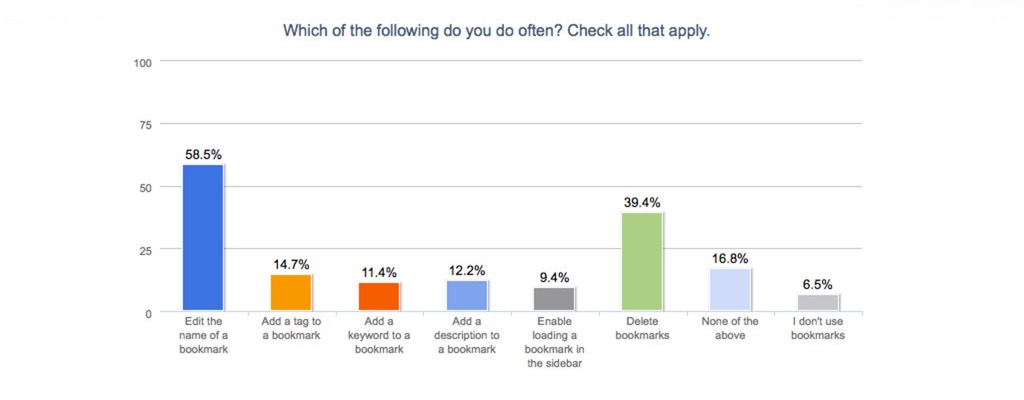
The survey asked Firefox users which things they did often. Renaming a bookmark won at 58.5%. Deleting bookmarks came second at 39.4%. Adding a tag (14.7%), a keyword (11.4%) or a description (12.2%) was rare. The deck does not say how many people answered, so read these as the habits of one keen group of Firefox users in 2012, not of everyone. Still, people spent their effort pruning and renaming, not filing, which matters if you came here to find out how to organize bookmarks.
The number the apps do not publish
I looked for a save-to-read ratio from the companies that would know it: Pocket, Instapaper, Readwise, Matter and Raindrop. I found none. Their pages talk about saving. Instapaper's free plan lets you "Save unlimited articles, videos, and other pages". Matter's home page opens with "Save. Read. Grow." Readwise Reader is the most candid: "Everyone has a forgotten folder of PDFs."
The figure people repeat comes from a 2013 Hacker News comment: "I read somewhere by one of the developers behind those read it later apps that its not uncommon for people to have over 10,000 unsaved items never read." I tried to find that developer and could not. So treat 10,000 as folklore. It is plausible folklore, given that Instapaper's free tier puts no limit on saving and none on not reading.
Such a number would be hard to measure anyway, since opening an article is not reading it, and reading it in the browser before saving leaves no trace in the app.
The psychology, with its limits
Japanese has a word for the book version of this. The Daijisen dictionary defines tsundoku as a pun on "tsunde oku", to leave piled up, and the "doku" of reading: buying books and only stacking them, not reading them at all. Merriam-Webster has no entry for it. A bookmark list is tsundoku with no shelf to make you feel guilty.
The rest of the research explains parts of the problem. None of it was done on bookmarks.
The planning fallacy is the best documented part. In Buehler, Griffin and Ross (1994), people's predictions of how long their own academic and non-academic tasks would take were too optimistic, while observers predicting other people's tasks erred the other way. In think-aloud sessions they described a plan for the future rather than what had happened last time. When told to connect the prediction to their past experience, the bias went away. I read only the abstract, which gives no sample sizes. A saved article is a small plan of exactly this kind: I will read this on Sunday, as I did not last Sunday.
Pirolli and Card's information foraging theory (1999) models people looking for information like animals looking for food. People "will modify their strategies or the structure of the environment to maximize their rate of gaining valuable information." On that view a bookmark is a cheap way to change the environment: you mark a patch as rich and move on to the next one. The theory says nothing about whether you come back, and that is the trouble.
The study most often cited here is Sparrow, Liu and Wegner (2011) in Science. Across four studies, people who expected to have access to information later remembered less of the information and more of where to find it. I covered it in the post on cognitive offloading. The short version: in 2018 a project by Camerer and colleagues re-ran 21 social science experiments from Nature and Science with samples about five times larger. Thirteen replicated, and the effects came out about half as big as first reported. The part of the Sparrow paper that project tested, the claim that hard trivia questions make people think of computers, did not replicate.
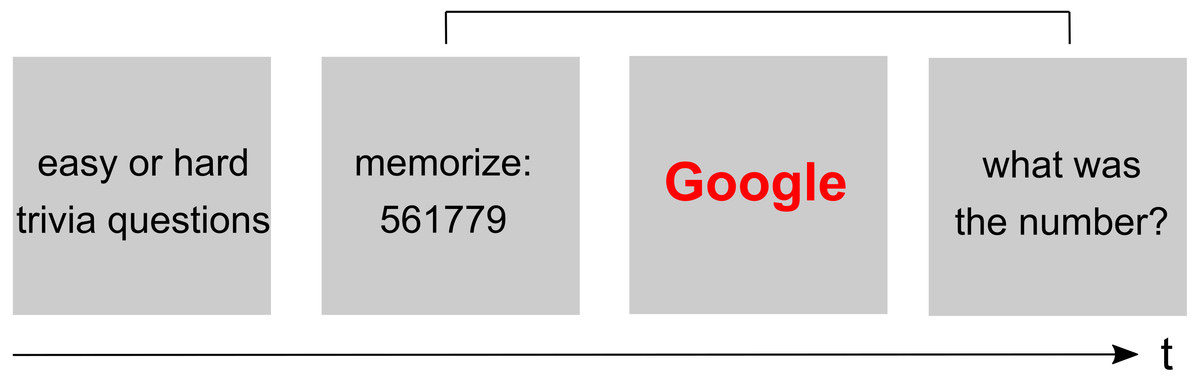
Sparrow objected to the replication's design. Guido Hesselmann then ran it again closer to the original, with 117 people tested and 89 analysed, and found "no conclusive evidence" for it. He also notes that the original paper is unclear about whether its first experiment had 69 participants or 46. The replications I could read tested the priming experiment. The memory finding, the one that sounds like bookmarks, was not what they retested, so they neither confirm nor refute it. I would not build a theory of your reading list on it.
The most useful idea comes from a blog post, not a paper. In 2014 Christian Tietze, who writes about the Zettelkasten note-taking method, named the collector's fallacy: "'to know about something' isn't the same as 'knowing something'." He starts from Umberto Eco's warning that students' photocopies become an alibi, and carries it over to the web: "The digital pile of bookmarks isn't any different from a tangible pile of papers we consider worth knowing. Here, too, kept isn't read, though." His argument is that saving is rewarded at once and reading only later, so saving wins. That is an argument from experience, with no data behind it, and it matches everything above.
Are X bookmarks public?
No. X's help centre says it in one line: "No, Bookmarks are private and are only viewable to you within your X account." X's developer documentation says the same thing to programmers: "Bookmarks are private and only visible to the user who created them." An app can read them only if you sign in to X and give it permission, and then only for your own account.
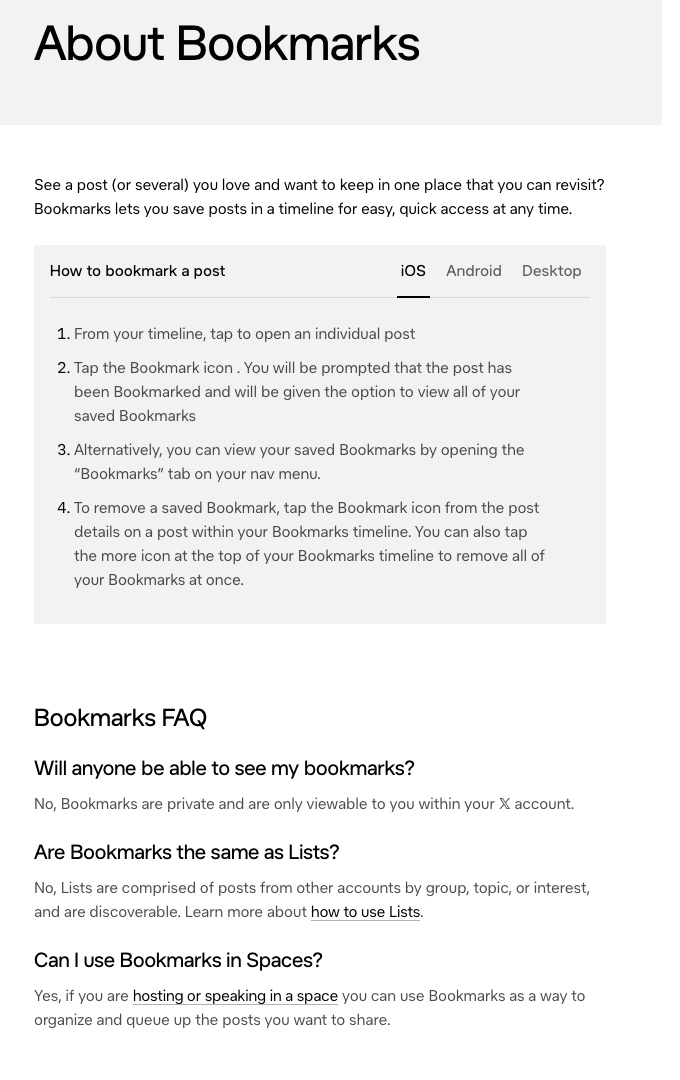
The same help page answers two questions people ask next. Bookmarks are not Lists, which are discoverable. And you can remove every bookmark at once from the more icon at the top of your Bookmarks timeline, which is the fastest way out of the graveyard if you decide the backlog is not worth reading.
The "x bookmarks" searches have nearly doubled in a year, and most of page one is tools for searching, exporting or organizing them. Searching and exporting make the list easier to find things in, and leave it as long as it was.
How to organize bookmarks, if you must
Folders and tags answer the question "where is that thing I saved?" The Mozilla interviewees often answered it with Google or their email search instead. One found a laser tag place by searching its name and town, and said a bookmark would only have helped if the wording had been more generic. Organizing is worth doing for reference pages you return to: your bank, a man page, a spreadsheet. For things you meant to read, sorting by topic only gives the pile more shelves. If you sort at all, sort by occasion: things short enough for a coffee, things for a train, things to listen to.
What people do that works
The people who say they solved this changed the moment when saving turns into reading, or stopped saving:
| Habit | Who said it | What it costs |
|---|---|---|
| A weekly email of the week's new bookmarks | The person building Birdfeeder, a tool for X bookmarks | Another email to ignore, if the list is long |
| A monthly sitting with a promise to readers | swyx, who writes a monthly recap | Four weekends a year, and an audience |
| Read it the next day or delete it | A Hacker News commenter | You lose what you did not get to |
| Read it now or never | wenbin on Hacker News | You read less, and you read it when you are interested |
| Listen instead of read | modeless on Hacker News | Hard for papers, code and anything with figures |
| One hour of collecting, then process it all | Christian Tietze | Discipline, and a timer |
The weekly email is the clearest case. Its builder explains that he started with "a weekly email of my newly added bookmarks", and adds: "As it's the case with bookmarks, I never went back to read them, so the email reminder works well for me." The email works because it brings the list back to you on a fixed day. It does not need you to remember. Tweetsmash sells a version of this for X: scheduled digests, sized to "how much to read from your preferred reading time".
swyx's version adds an outside reason. Having promised his readers a monthly recap, "every 4 weekends i sit down and blast thru as many as i can and write a halfway decent summary." The deadline is someone else's, so the Sunday that never comes gets a date and an audience.
The delete rules are the honest end of the table. "I send it to my todo app, and read it the next day or delete it. No piling off links I never read." "If I see something I want to read, I either read it immediately or never." A post on prertik.com titled "Read it never" ends: "delete your bookmarks." This is the Mozilla survey's 39.4% made into a policy.
Listening works for a different reason: it moves reading into time you were not using for anything. The commenter who said "I never read the things I bookmark for later reading, but I have extra time to listen to things" listens while doing the dishes or working out. I went through the evidence on whether that counts in the post on audiobooks: for most prose, listening and reading give about the same comprehension. For a hard argument neither does much unless you then use the idea, which is the point of the post on remembering what you read.
What Understand does with your bookmarks
Understand keeps a Bookmarks list, and the reason it exists is the problem above. Things get onto it from a Chrome extension, the iOS share sheet, a pasted link, a PDF upload of up to 25 MB, or your X bookmarks once you connect your account. Each item gets a one-line summary, a reading time and a topic.
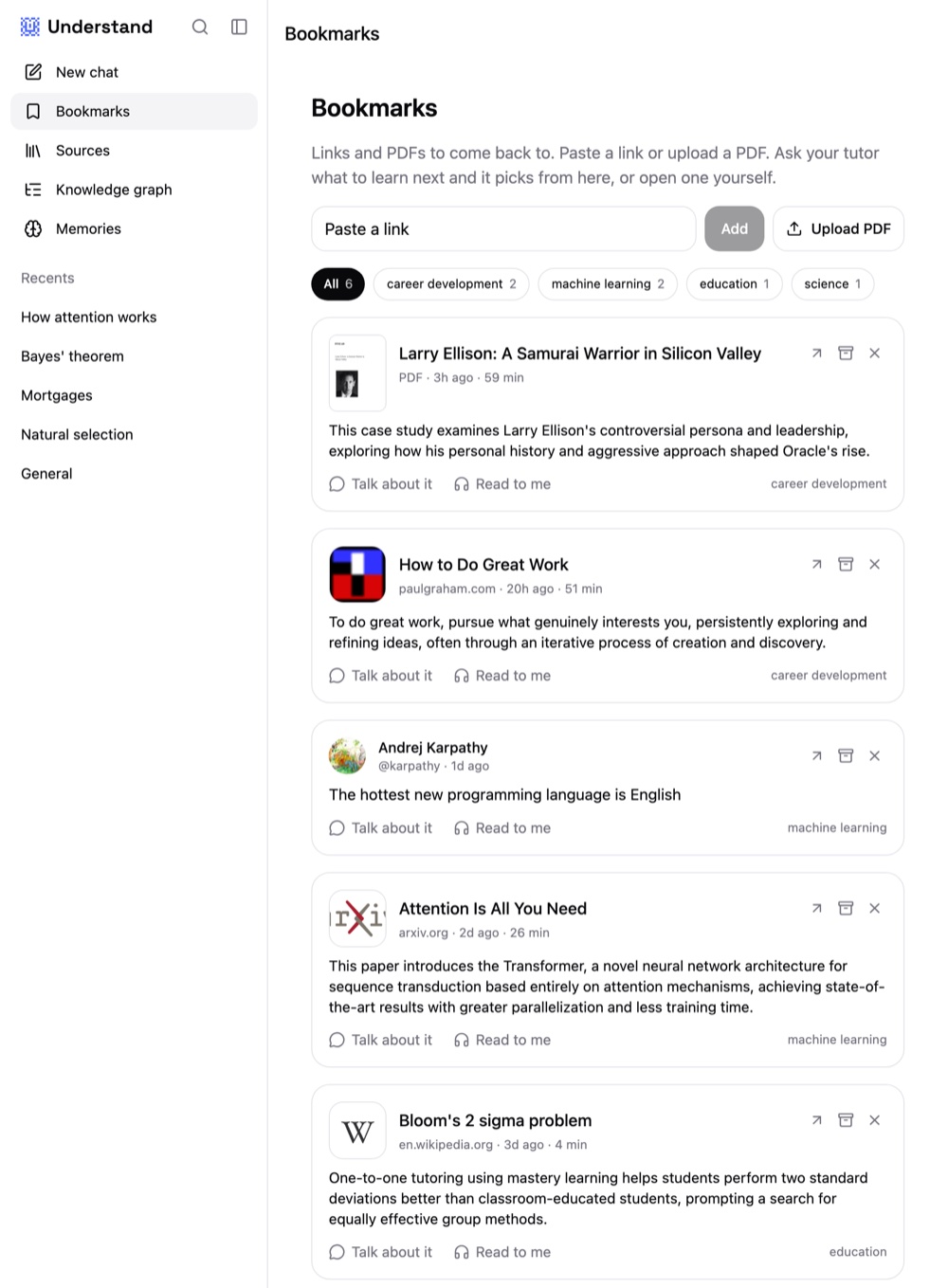
You also do not have to choose. You say how much time you have, "I've got ten minutes", and the tutor picks one of your unopened items, tells you how long it is and which idea in it is new to you, and asks whether to start there. That takes the decision you put off when you saved it and makes it in a sentence. Then it either talks the piece through with you, answering directly, drawing on a board, and ending each new idea on one question that takes the idea to answer, or it reads the piece aloud word for word and stops when you interrupt with a question (I compared it with other readers in the Speechify alternatives post). When one piece ends, the next unopened one can follow.
Saving something never counts as knowing it. Understand keeps a record of the ideas you have shown you understand, written from what you say in conversation, and an idea counts only after you have used it in two different contexts. You can read that record and correct it.
There are no reminders and no weekly digest email: if you never open the app, your list waits like any other. It has no Android app, no spaced repetition, and no trial has evaluated it. Tweetsmash's digests and Instapaper's text-to-speech playlists already do parts of this, and if you mostly want to file links, a plain read-later app is the better tool. I compared them in the read-later apps post. Understand is for adults, and it is free for now.