The best read later app, judged by what you finish reading
Pocket shut down in July 2025, and a lot of people went looking for a new read later app. I was one of them: I used Pocket for years, then Matter, and in both the list only grew. Almost every comparison I found judges these apps on saving and organizing. I wanted to know which ones get the articles read.
I build Understand, which is one of the apps below, so weigh my conclusion with that in mind.
Prices are for the US and were checked on 6 October 2026. Most of these apps are free to try, and the paid plans change often, so check the pricing page before you subscribe.
The problem with a read later list
Saving is easy and reading takes time, so the list grows. On Hacker News in 2017, philfrasty wrote that "99.5% of the articles I bookmark every day I never actually read." The same year markatkinson called his bookmarks "a graveyard for things I'll never read". The complaint has not changed. In 2025 wenbin described "accumulating far too many articles and never actually reading them", and in January 2026 Patlakh opened a Show HN for a new tool with "bookmark graveyards, nothing gets read".
The best number I have is secondhand. In 2013 OafTobark recalled a developer of one of these apps saying it is "not uncommon for people to have over 10,000 unsaved items never read." I could not find the original source, so treat it as a story rather than a statistic. I wrote more about why this happens in the post on why you never read your bookmarks.
So I compared these apps on one extra question beside price and platforms: when you open the app with forty unread articles, does it do anything to help you get through them?
Pocket and Omnivore have shut down
Mozilla announced that Pocket would shut down on July 8, 2025. Downloads and new Premium subscriptions stopped on May 22, and annual subscribers got prorated refunds. Mozilla's support page, which is now marked as no longer maintained, says the export window was extended to November 12, 2025. On that date the API was switched off and the deletion of accounts and user data began. I read it through the Wayback Machine copy, because the live page served me a captcha.
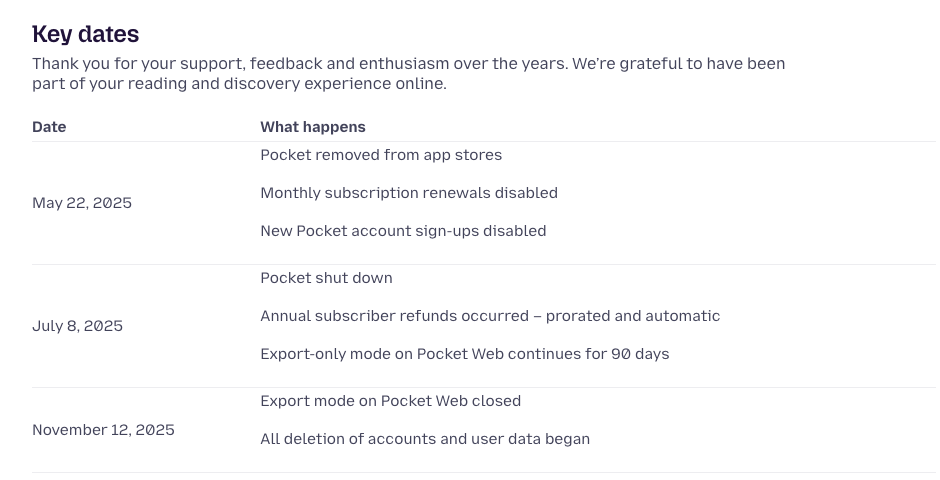
If you exported your Pocket data before November 12, keep the ZIP file. Most of the Pocket alternatives below can still import it. If you did not export, the saves are gone.
Omnivore, the free and open source read later app, closed a few months earlier. On October 29, 2024 its founders Jackson and Hongbo wrote that the team was joining ElevenLabs to work on ElevenReader. Users could export until November 15, 2024, and then the data was deleted. ElevenLabs' announcement put Omnivore at 500,000 users. The code is still open source, but there is no hosted service.
Two shutdowns in a year make it worth asking how each remaining app makes money and whether it lets you export.
Read later apps compared
| App | Platforms | Free tier | Paid price (6 Oct 2026) | Text to speech | Import from Pocket | What helps you get through the list |
|---|---|---|---|---|---|---|
| Instapaper | Web, iOS, Android | Unlimited saves, folders, 5 notes a month | $5.99 a month, $59.99 a year | Premium, mobile only | Yes, from the export file | Speed reading up to 3x, TTS playlists, Kindle sending |
| Matter | iPhone, iPad, web | Basic read later, free | $7.99 a month, $79.99 a year (App Store) | Premium | Yes, "Import Pocket" in the Queue | Power Queuing to reorder and triage, TTS playlists |
| Readwise Reader | Web, iOS, Android | 30-day trial only | $12.99 a month, $9.99 a month billed yearly | Yes | Yes, upload the Pocket ZIP | Inbox and Later triage, highlights resurfaced in Daily Review |
| Raindrop.io | Web, Mac, iOS, Android, browser extensions | Unlimited bookmarks and highlights | About $30 a year, $2.99 a month on the App Store | No | Yes, Pocket's HTML export | Reminders on Pro |
| GoodLinks | iPhone, iPad, Mac | None | $9.99 once, $4.99 a year for new features | No | Yes | A widget that opens a random unread link |
| Safari Reading List | Apple devices | All of it | None | Listen to Page in Safari | No | Topic groups with Apple Intelligence |
| ElevenReader | iOS, Android, web | 10 hours of audio a month | $11 a month, $8.25 billed yearly | Yes, the main feature | Not that I found | Listening while you do something else |
| Wallabag | Web, Android, iOS, self-hosted | Free if you host it | €11 a year hosted, €4 for 3 months | Android app | Yes | None beyond tags and filters |
| Understand | Web, iOS through TestFlight | Free for now | None yet | Yes, word for word | No | Reads aloud, you interrupt to ask, keeps a record of what you understood |
Instapaper
Instapaper launched in 2008 and is the oldest app here. Its Pocket page is signed by Brian, who runs it, and says the company is "not VC-backed" and is "profitable, independent". After two shutdowns that sentence counts for something. The same page walks you through importing a Pocket export.
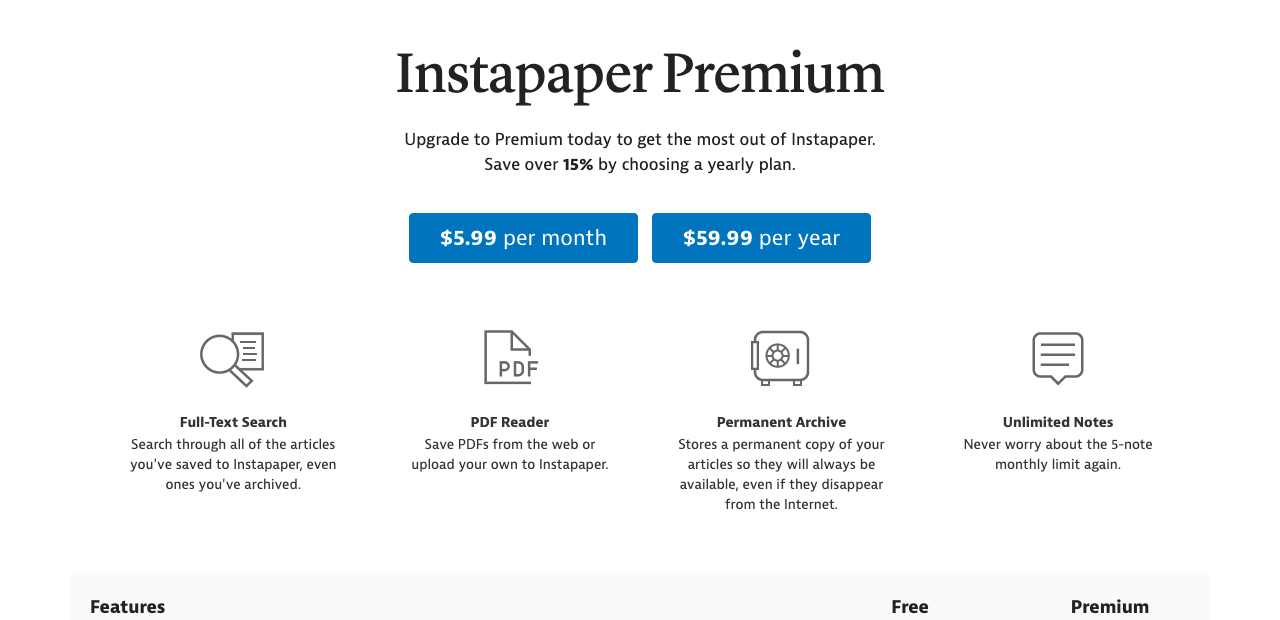
The free tier is generous. You get unlimited saves, sync across web, iOS and Android, folders and an API, with a limit of five notes a month. Premium at $5.99 a month or $59.99 a year adds full-text search, a permanent archive of every article, a PDF reader, unlimited notes, Kindle sending, AI voices with text-to-speech playlists on mobile, and speed reading up to 3x. The iPhone app is rated 4.6 from 3,542 ratings, and Instapaper 10 brought the AI voices.
For getting through the list, Instapaper has two tools. The text-to-speech playlist plays saved articles in a row, which is how I would use it on a commute. Speed reading flashes the words one at a time, faster than you would normally read, which gets you to the end of an article sooner but gives you no chance to go back over a sentence. Kindle sending is the third route, if you read better on an e-ink screen than on a phone. You can export everything as CSV from the export page, and if you want an Instapaper alternative, Raindrop imports that file and Readwise Reader connects to your Instapaper account directly.
Matter, the reading app
Matter, the reading app, calls itself a "modern read-later app for iPhone, iPad, and web", and Apple has made it App of the Day three times. Its home page greets visitors with "Welcome Pocket Readers". The Pocket page carries a letter from cofounder and CEO Ben Springwater, who cold-emailed Pocket's founder Nate Weiner for an internship in 2015.
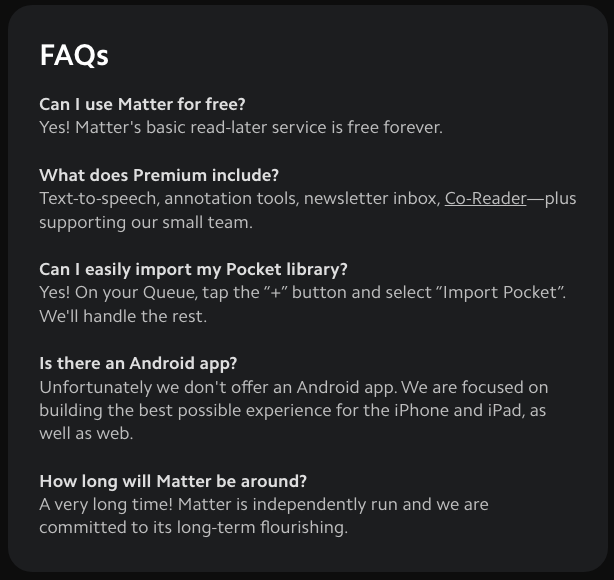
The FAQ on that page answers the practical questions. The basic read later service is free. Premium adds text-to-speech, annotation tools, a newsletter inbox and Co-Reader. To import, you tap "+" on the Queue and choose "Import Pocket". There is no Android app, and the FAQ says Matter is focused on iPhone, iPad and web.
Matter's own pricing page returned a 404 when I checked. The App Store listing sells Premium at $7.99 a month and $79.99 a year, and Pro at $12.99 a month. An older Patron page still on the site shows $8 a month and $60 a year. I would trust the App Store figure, since that is what you will be charged on an iPhone.
Matter does more than any other app here to help you get through what you saved. Its queue can be reordered, filtered, shuffled and triaged, which Matter calls Power Queuing. Newsletters arrive in the same queue, from Gmail or a Matter email address, and you can follow writers and feeds. YouTube videos and podcasts are transcribed, and you can switch between listening and reading the same article. If you read on an iPhone, Matter is the app I would try first.
Readwise Reader
Readwise Reader takes the most kinds of content: web articles, PDFs, EPUBs, newsletters, RSS feeds, YouTube videos and Twitter threads. It comes with the Full Readwise plan, which is $9.99 a month billed yearly ($119.88) or $12.99 month to month. Readwise Lite at $5.59 a month does not include Reader. There is no free tier, only a 30-day trial.
Moving in is easy. The migration docs say you can upload the pocket.zip from your Pocket export on the Integrations page, and they warn that Safari may unzip the file when it downloads, which breaks the import. Instapaper connects by account. Matter's export is forwarded by email, and tags are lost.
Reader's answer to an overflowing list is triage. New saves land in an Inbox, and you move each one to Later or to Archive, so every article gets a decision before it joins the list. The text-to-speech uses AI voices and can start from any paragraph, and a triple tap on AirPods highlights the sentence you are hearing. Those highlights go into Readwise's Daily Review, an email and in-app session that shows you passages you highlighted earlier. Of everything in this list, that review is the closest thing to checking whether you kept what you read. It shows you your own highlights and asks you to reread them. It does not ask you to explain anything.
Raindrop.io
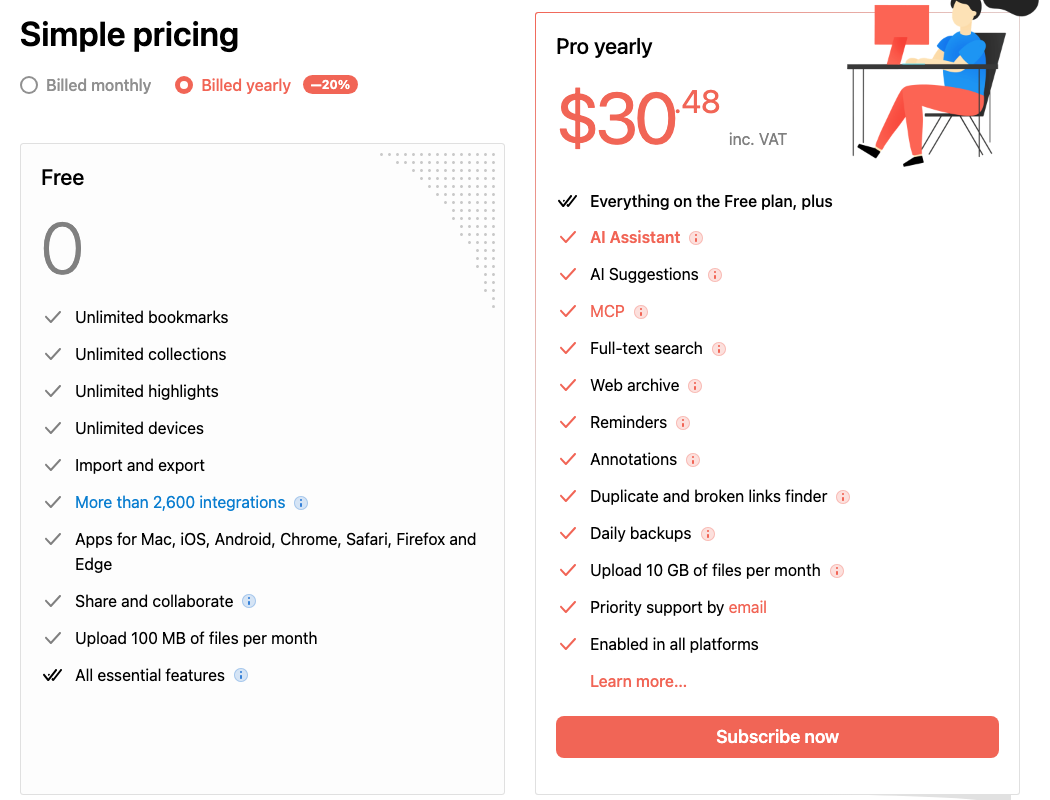
Raindrop.io is a bookmark manager. It saves links into collections with tags, highlights and full-page archives, and it runs on almost everything. The free plan covers unlimited bookmarks, collections, highlights and devices, plus import and export and 100 MB of uploads a month. Pro adds an AI assistant, MCP, full-text search, a web archive, reminders, annotations, a duplicate and broken link finder, and daily backups.
The import page accepts Pocket's HTML export, plus CSV files from Instapaper and Readwise Reader. Raindrop has no text-to-speech. The one feature aimed at reading is Reminders, on Pro, which sends a push notification or an email at a time you pick. If you search "raindrop alternative" because you want to read more of what you save, pick a reading app instead. Raindrop is good at storing links you want to find again.
GoodLinks
GoodLinks costs $9.99 once and works on iPhone, iPad and Mac. It syncs through iCloud and needs no account. The purchase includes a year of new features; after that, a $4.99 Annual Feature Upgrade unlocks later ones, and what you already have keeps working. It has highlights and notes, deep Shortcuts support, and summaries through Apple Intelligence or your own API key. The FAQ lists Pocket among its imports.
I found no text-to-speech in its release notes, and a Mac Power Users thread from January 2025 says the same. Its one nudge to read is a home screen widget that opens a random unread link. One App Store reviewer said it gave them more for a year than a single month of Readwise, and if you only want a clean reader on Apple devices, I agree with them.
Safari Reading List
Safari's Reading List is already on every iPhone, iPad and Mac. Apple's guide covers Add to Reading List, saving offline automatically, and swiping to delete. With Apple Intelligence it groups items into suggested topics once three or more are related. Safari's Listen to Page will read an article aloud, which I covered in the post on Speechify alternatives.
It cannot import a Pocket export, and it does nothing to remind you the list exists. It costs nothing, though, and if you save a few articles a week and read them the same evening, you may not need anything else.
ElevenReader
ElevenReader is a listening app from ElevenLabs, where the Omnivore team went. You add content by pasting a link, writing or scanning text, or uploading an EPUB, PDF, TXT, HTML or DOCX file, and there is a Chrome extension for saving pages. The free plan gives you 10 hours of text to audio a month, which the pricing page says is about a 400-page book. Ultra costs $11 a month or $8.25 billed yearly and removes the limit. The iPhone app is rated 4.7 from 10,569 ratings.
I found no Pocket importer, so it is a poor home for an old library. As a way to get through this week's saves, it works well: you hear the article while you walk or cook. Listening does not guarantee you take the article in, which I wrote about in the post on audiobook alternatives for learning.
Wallabag and other self-hosted apps
If the Pocket shutdown made you want an app nobody can close, host one yourself. Wallabag has been open source since 2013. It imports from Pocket, Omnivore, Instapaper and Pinboard, and exports your articles, tags and annotations. You can run it on your own server for free or pay wallabag.it €11 a year to host it, with a 14-day trial. The Android app lists speech synthesis to listen to your articles. The iOS app is on the App Store, though the project said in March 2026 that it is no longer the official open source app.
Wallabag does nothing to get you through the list. It keeps your data in your hands, and that is the reason to choose it.
Linkwarden and Karakeep (formerly Hoarder) are the other self-hosted names people suggest. Parth Shah at XDA tried Readeck, Karakeep and Linkwarden after Pocket closed and picked Linkwarden for its interface, reader mode, organization and AI integration. Both lean toward bookmark management, like Raindrop.
Understand
Understand is the app I build, and it does a narrower job than the others. Its list is called Bookmarks. Articles arrive from a Chrome extension, from the iOS share sheet, from your X bookmarks once you connect your account, or by uploading a PDF. Each item has two buttons, Talk about it and Read to me.
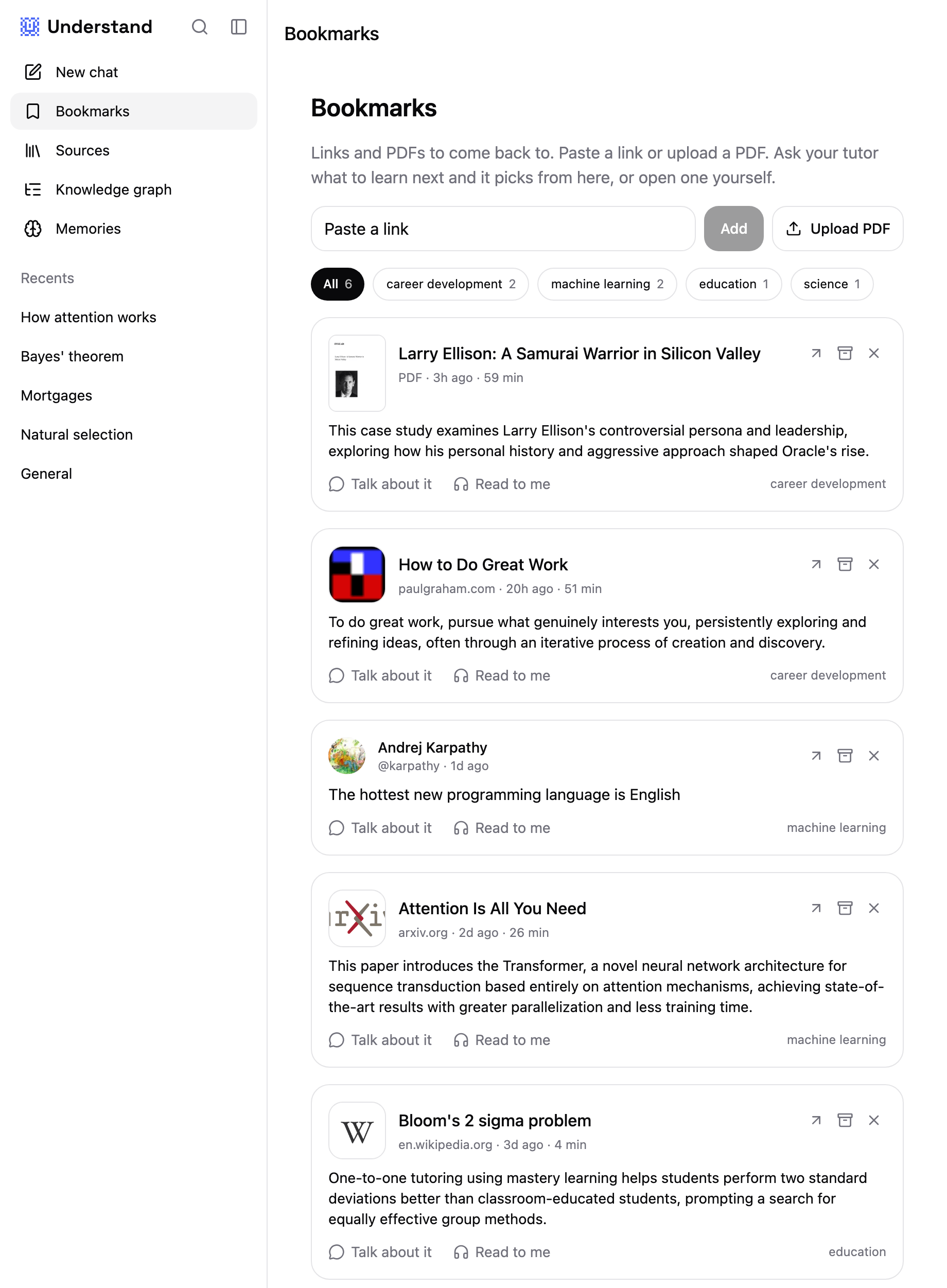
Read to me reads the text word for word, at 0.75x to 4x. When a sentence loses you, you say so out loud. The reading stops, the tutor answers from the text, and then the reading continues from the sentence where you cut in. Talk about it starts a conversation about the piece instead. Understand also keeps a record of what you have understood. It is written from what you say when you talk about a piece, in a knowledge graph you can read and edit, and having an article read to you adds nothing to it.
Reaching the end of an article and keeping it are different things. In Roediger and Karpicke's 2006 experiment, students who reread a passage were the most confident about remembering it, and a week later they recalled 42% of it against 56% for students who had written down what they could recall. The other apps here count an article as done when you reach the end. I wanted one that would also notice whether I could explain it.
Things the other apps do that Understand does not
Understand has no importer for Pocket, Instapaper, Raindrop, Readwise or Omnivore, and no CSV or bulk import. If you have an old library of a few thousand links, it will not take it. Keep that library in Instapaper, Raindrop or Wallabag.
It has no highlights, no tags, no RSS feeds and no newsletter inbox. Readwise Reader and Matter are far ahead there. There is no Android app; the web app works in any browser, including on Android phones. The iOS app is in TestFlight. Reading aloud needs a connection, so it will not help you on a plane, and it has two voices where ElevenReader has more than a thousand. It is free for now, and I cannot promise what it will cost later.
Picking a read later app
If you read on an iPhone and want help getting through the list, try Matter. Power Queuing and the shared audio and text view do the most for an overflowing queue.
If you want the cheapest app that will still be around, use Instapaper. It is free for most people, profitable, and runs on Android.
If you highlight a lot and want those highlights back, pay for Readwise Reader. Its triage and Daily Review are the closest any of these come to helping you keep what you read.
If you mostly want to store links and find them again, use Raindrop.io. If you never want another shutdown email, host Wallabag. If you are on Apple devices and dislike subscriptions, buy GoodLinks.
If you want to listen through the list, ElevenReader's free 10 hours a month will cover most people. For broader recommendations, see the post on learning apps for adults, and if your saves are mostly long PDFs you want to question rather than read, the NotebookLM alternatives post covers tools built for that.
For the few articles you saved because you wanted to be able to argue with them, try this: finish one in any app, close it, and explain the argument out loud. If you cannot, Understand will read it to you and stop when you ask.