ChatGPT voice mode for learning in 2026: Live, the 3-hour limit, memory and files
ChatGPT voice mode is good for talking an idea through out loud, for up to 3 hours a day on the $20 Plus plan, and weak at reading a text to you or keeping track of what you have understood. In September 2025 OpenAI said its oldest voice option, Standard, would be retired after a 30-day sunset, and on October 6, 2026 the help page still lists Standard as one of three voices you can pick. I did not use ChatGPT voice for this post. It rests on OpenAI's help centre, release notes and launch post, read on October 6, 2026, on what people wrote on Reddit, and on one observation from an earlier test of mine.
I build Understand, a voice tutor for adults, so I have a stake in how this comes out. Where ChatGPT is the better choice I say so.
The three voice options
OpenAI's voice FAQ describes three options, chosen under Settings > Voice. Live is the newest. It "can listen and speak at the same time, making turn-taking and interruptions feel more natural", and runs on GPT-Live-1 or GPT-Live-1 mini, depending on your plan. Advanced is "the previous real-time Voice experience", which you now pick only "when you need supported mobile capabilities such as video or screen sharing". Standard is "a turn-by-turn Voice experience that transcribes your speech before generating a response."
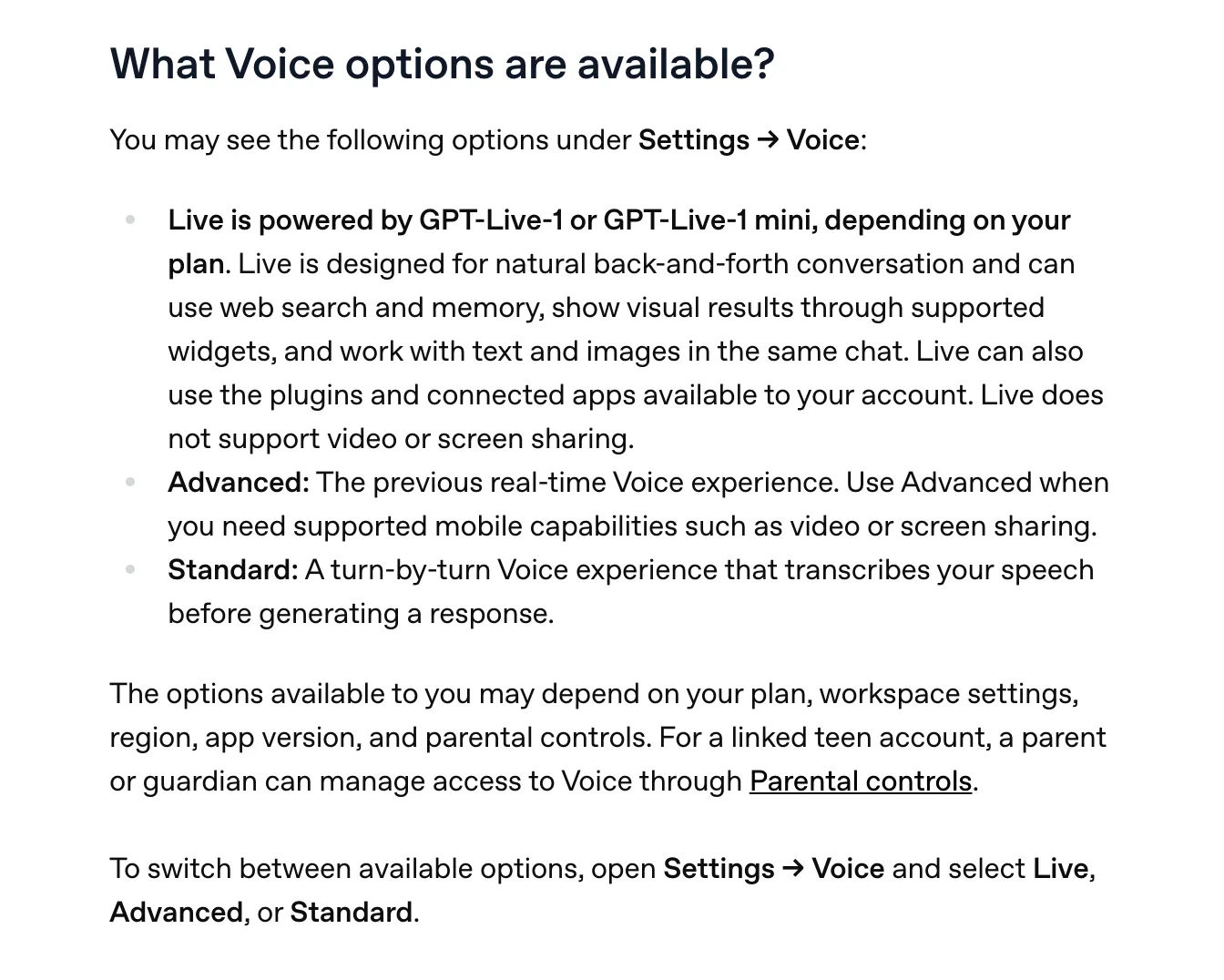
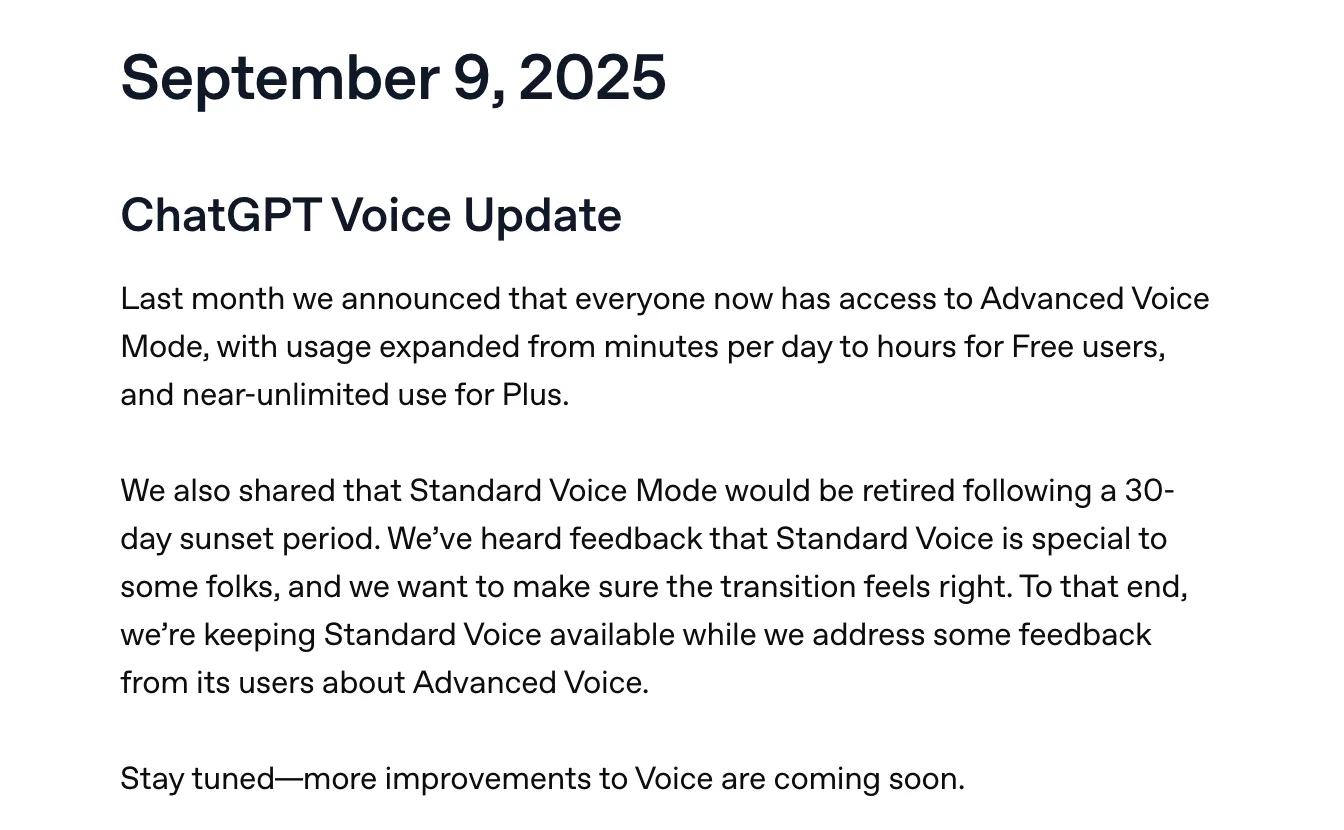
Standard has been about to leave for a while. A release note dated September 9, 2025 says OpenAI had announced the month before that Standard "would be retired following a 30-day sunset period", and then changed course: "we're keeping Standard Voice available while we address some feedback from its users about Advanced Voice." Thirteen months later the feedback is apparently still being addressed.
Live arrived on July 8, 2026. OpenAI's launch post explains the design that matters most for learning. GPT-Live handles the conversation, and "for questions that require web search, deeper reasoning, or more complex work, it delegates to our latest frontier model behind the scenes and brings the result back into the conversation when it's ready." At launch that model was GPT-5.5. A September 9, 2026 release note says voice can now use GPT-5.6 or GPT-6 Astra "when it needs to search or reason through harder questions", and that you choose the model and reasoning effort "using the same controls as text chat."
So the voice you hear and the model that does the hard thinking are two different things, and the voice decides when to hand over. OpenAI says GPT-Live-1 "substantially outperforms Advanced Voice Mode on GPQA", which it describes as a test of "expert-level scientific reasoning across biology, chemistry, and physics." Those are OpenAI's numbers on OpenAI's tests.
Some heavy users disagree with the direction. A Plus user who wrote that they had used voice daily for over a year posted on r/ChatGPT on August 15, 2026 that Live felt "dramatically impoverished". They described giving it a two-minute thought with several ideas in it and getting back "Hmm. That makes sense. It sounds like this is important to you." They later called Live "more like being trapped in an elevator with a heavily tranquilized guidance counselor", which is unfair and also the most vivid product review I read this month. Their workaround was to use typed chat and press the speaker button to hear the answer read out.
For learning, I would read that as a reason to ask Live hard questions on purpose, since a question that needs reasoning is the kind OpenAI says it passes to the bigger model.
Daily limits
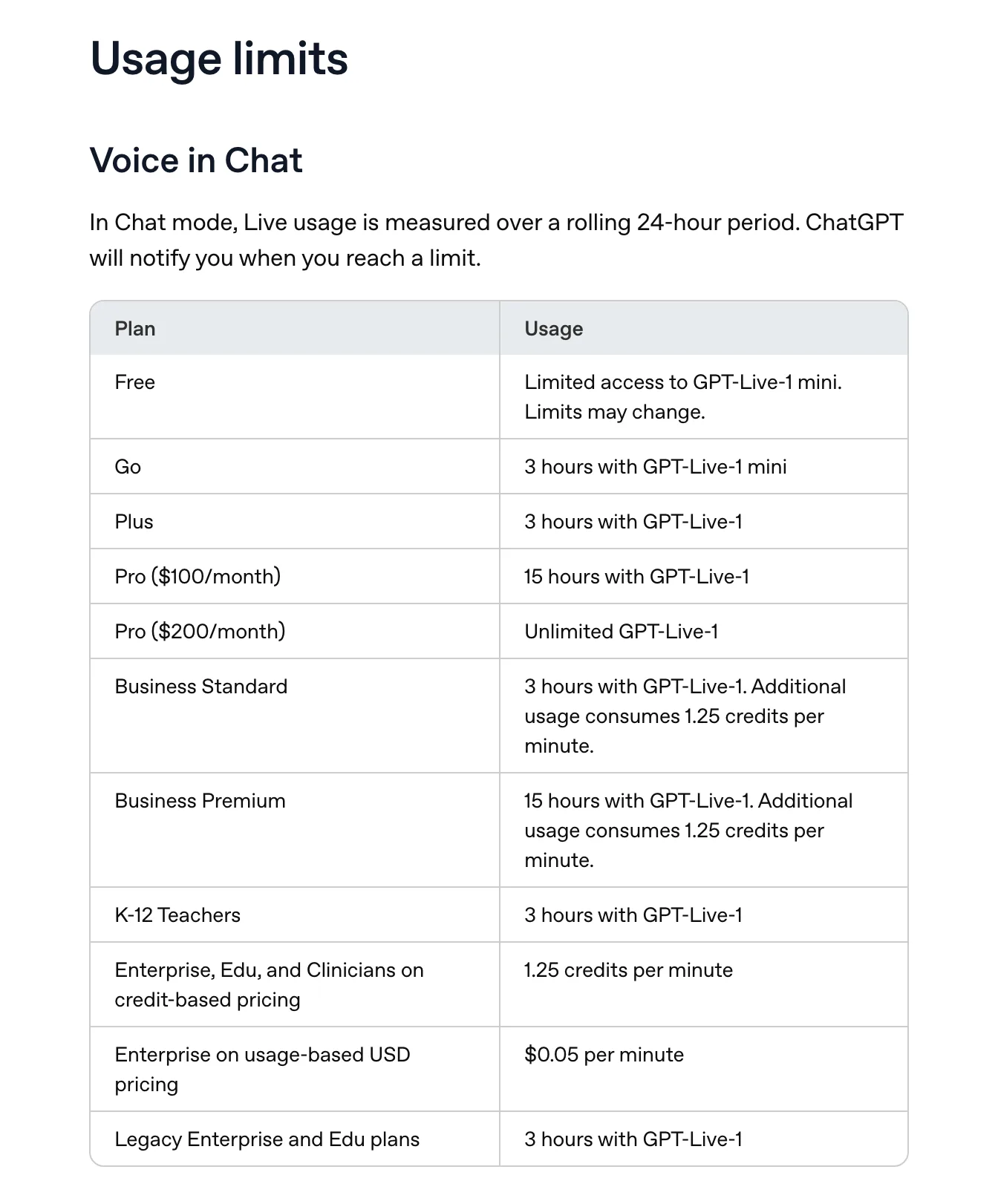
Live is metered in hours per rolling 24-hour period, per the voice FAQ, and "ChatGPT will notify you when you reach a limit." Prices are from OpenAI's pricing page and hours from the FAQ, both read on October 6, 2026.
| Plan | Price a month | Live voice per rolling 24 hours |
|---|---|---|
| Free | $0 | "Limited access to GPT-Live-1 mini. Limits may change." |
| Go | $8 | 3 hours with GPT-Live-1 mini |
| Plus | $20 | 3 hours with GPT-Live-1 |
| Pro | $100 | 15 hours with GPT-Live-1 |
| Pro | $200 | Unlimited GPT-Live-1 |
The pricing page puts a single "Unlimited*" in the Pro column for voice, where the FAQ and the September 9 release note give the $100 tier 15 hours. The pricing page says Go "may include ads". Since September 9, Plus and Pro "no longer switch to GPT-Live mini after reaching a Voice limit". The FAQ says a voice conversation "may end when you reach a usage limit", and that you can carry on in text.
Three hours is a generous study session. It was not always this much. In October 2024 a student asked on r/ChatGPT whether to pay for Plus because Advanced voice "was very effective with tutoring me for my exams. But only 45 min is not enough." Replies in that thread put the Plus limit at about an hour, and one person said they timed it with a stopwatch at 60 minutes and 7 seconds. When Live launched in July 2026, Plus users in another thread were again hitting an hour, and a $200 Pro subscriber reported the same cap. An account named atty-openai replied: "Pro 200 should have no limits." The September 9, 2026 release note is the one that sets Plus at 3 hours.
Free is the hard case. "Limited" is the whole description, and on August 28, 2026 a Free user wrote that ChatGPT said they had hit the daily limit "immediately after starting", for several days running. If you want to study by voice for an evening, the free plan is a sample.
Interrupting, and being interrupted
Being able to cut in is the main thing a voice tutor has over a recorded lecture. The FAQ says you can interrupt Live or keep talking while it responds, and that "ChatGPT should follow the latest part of the conversation, but overlapping speech, background noise, network conditions, and microphone settings can affect what it hears."
It also cuts in on you. OpenAI's launch post lists as a feature that GPT-Live "can show it's paying attention with phrases like 'mhmm' or 'yeah'", or "just stay quiet when you need a moment to think." A commenter in the August thread wrote that it "kept interrupting me with 'mmmm' 'yeah' 'right' etc. which made me keep losing my train of thought." On July 19, 2026 a user preparing for a deadline wrote that they had upgraded to Pro for the hours and then could not "talk naturally because it keeps interrupting me."
Working out a hard idea out loud involves long pauses and half-finished sentences, so this matters more for study than for asking about the weather. Standard is the option to try if Live keeps cutting in. It waits for you to finish, because it transcribes what you said before it answers.
Memory, files, study mode and video
Live "can use web search and memory", per the FAQ. OpenAI's Memory FAQ says ChatGPT "can remember relevant preferences and details from your chats and other available sources", drawing on past chats, saved memories, files in your Library and connected apps such as Gmail. It also says "Memory does not retain every detail from every conversation." In a July 9, 2026 thread asking whether voice shares memory with text chat, one commenter said Live's memory retrieval worked "50/50" for them, "even if asked directly with very precise wording."
You can read and correct what ChatGPT remembers. Settings > Personalization > Memory has a memory summary, which OpenAI calls "a high-level view of information that ChatGPT may use to personalize responses."
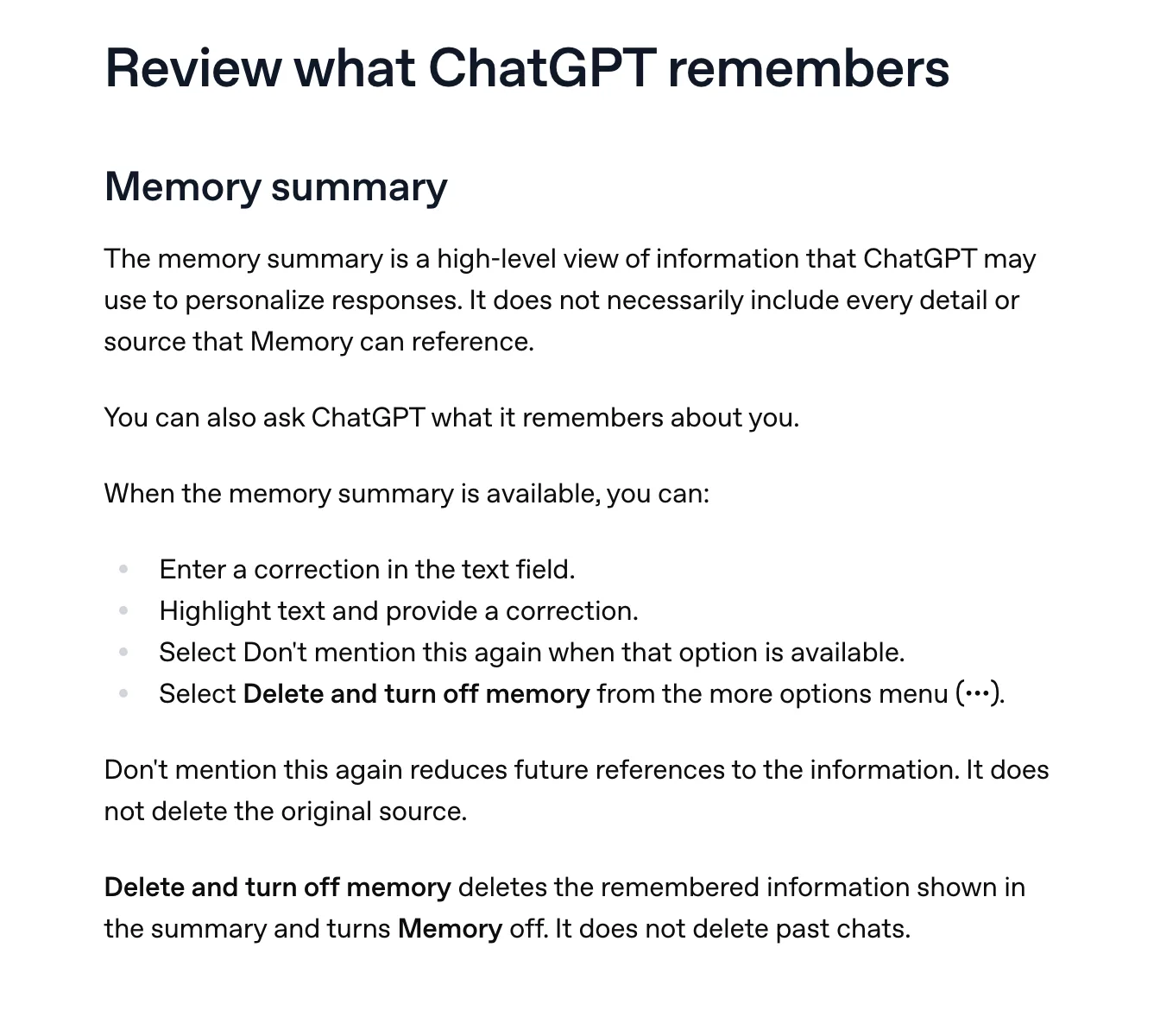
That summary is about you: preferences and details. I found no OpenAI page that says ChatGPT keeps a record of which ideas you have understood, in voice or in text. It will remember that you are studying for the bar exam. Nothing documented tells it whether you got the rule against perpetuities last Tuesday.
Files changed this summer. A release note from August 7, 2026 says Live "now supports file uploads and Projects", so you can "upload files in a voice conversation and analyze its contents or ask questions", and use voice in a project with its chats, sources and instructions. The FAQ adds a limit: "Live cannot currently find or add files from your ChatGPT Library", though you may be able to attach a file to the chat by hand.
I once asked ChatGPT's voice mode how much of an article it could see, and it said it had a high-level summary, or the first few sentences. I have not checked whether the August change altered that. In a typed chat it quoted an uploaded PDF word for word. Both tests are in my Study Mode review. OpenAI's voice pages say nothing about reading a document aloud verbatim, and the FAQ says even the transcript of your own conversation "may not exactly match what you or ChatGPT said."
Study mode does not reach voice either. Its help page mentions voice once: "If voice dictation is available, you can use it to ask questions in study mode instead of typing." Dictation turns speech into a typed message, which is a different feature from a voice conversation. The Projects page says "Study mode and scheduled study hours do not apply to project conversations", so a voice chat in a project gets neither. If you want ChatGPT to quiz you in voice, you have to ask it to, and keep asking.
Video is the one place the old voice beats the new. "Live does not support video or screen sharing," says the FAQ. Advanced still does, on iOS and Android, for eligible subscribers. You can point your phone at a page of handwritten algebra or a circuit and ask what is wrong with it. For a lot of practical learning that is worth more than anything else on this page, and it means switching to Advanced in settings first.
"Preset ChatGPT personalities do not currently apply to Live," the FAQ says, so a tone you picked for typed chat may not carry over. I found nothing either way on whether custom instructions apply in Live. And under Settings > Voice > Language you can set the language you speak most often, which OpenAI says helps it understand you.
Using it to study
These come from OpenAI's pages and the threads above, not from a test of mine.
- Pick Live for a back-and-forth about a topic, and Standard if Live keeps cutting in while you think.
- Ask the questions that need reasoning, since those are the ones it hands to the larger model, and pick that model and its reasoning effort with the same controls you use in text chat.
- Ask it to question you after it explains something. Nothing in OpenAI's voice pages says it will do so on its own.
- Upload the document into the voice chat, and switch to typed chat when you need its exact words.
- Switch to Advanced on your phone when the thing you are stuck on is on paper.
- Read the transcript afterwards, knowing it is not verbatim.
Where ChatGPT voice is the better choice
ChatGPT voice runs on more devices than any tutor I know of. It works on the web, iOS, Android and the Windows app. The macOS app's voice was retired on January 15, 2026, and a July 23, 2026 note brought voice to Work and Codex in the desktop app. Since April 2026 it runs in Apple CarPlay with iOS 26.4 or newer. Since August 31, 2026, a Live conversation can show on the iPhone lock screen and in the Dynamic Island. Since September 23 it can use plugins and connected apps during a conversation.
It knows something about everything, and it can search the web when it does not. OpenAI says "more than 150 million people" talk to ChatGPT each week using features like Voice and Dictation. If you already pay for Plus, three hours of Live a day is included. Through Advanced it can also see what you point your phone at, which Understand cannot.
What Understand does differently
Understand is a voice chat with an AI tutor that you can interrupt. It answers directly. When it has explained an idea that is new to you, it ends on one question that you can answer only by using the idea: predict a case it did not cover, or say where the idea breaks. If you get it right it goes deeper, and if you get it wrong it tries a different explanation. David Deutsch's test of a good explanation is that it is hard to vary while still accounting for what it explains, and the quickest way to find out whether you hold one is to try it on a case nobody gave you.
It draws on a board while it talks. Save a link or upload a PDF and it reads the text aloud word for word, sentence by sentence. Ask a question and it stops, answers, and resumes at the same sentence. It talks through the links and PDFs you bookmarked.
It keeps a record of the ideas you have shown you understand, written from what you say in conversation, mostly from your answers to those questions. An idea counts only after you have shown it in two different contexts. You can open the record, read it and correct it.
It has no courses, no problem sets and no spaced repetition. It runs on the web and iOS, with no Android app, and it cannot see anything you point a camera at. No trial has evaluated it. It is for adults, and it is free for now.
Questions
Is ChatGPT voice mode free?
Yes, with "limited access to GPT-Live-1 mini", which OpenAI says may change. Plus at $20 a month gets 3 hours of GPT-Live-1 per rolling 24 hours.
Can ChatGPT voice mode read a PDF to me?
Since August 7, 2026 you can upload a file into a voice conversation and ask about it. OpenAI documents no word-for-word read-aloud in voice. Live cannot fetch files from your Library.
Does study mode work in voice?
OpenAI's study mode page mentions voice only as dictation, which types your speech into the message box. It does not apply in projects.
Is Standard voice gone?
No. OpenAI announced its retirement in August 2025, said on September 9, 2025 that it was keeping it, and still lists it under Settings > Voice in October 2026.
Can I share my screen while studying?
Not in Live. Advanced supports video and screen sharing for eligible subscribers on iOS and Android.
For more on the typed side, see ChatGPT vs Claude vs Gemini for learning and the best AI tutors in 2026.